Fork me on GitHub

Nginx 相关总结

Nginx 安装

这里简单说下编译安装步骤。

1
2
3
4
5
6
7
8
9
10
11
12
13
14
15
16
17
18
19
20
21
22
23
24
#切换到root执行以下命令
su root
#下载源码包到 src 目录
cd /usr/local/src
#创建nginx用户
useradd -M -s /sbin/nologin www
#下载nginx
wget http://nginx.org/download/nginx-1.14.0.tar.gz
#解压
tar -zxvf nginx-1.14.0.tar.gz
#切换到源码目录
cd nginx-1.14
#安装检查/配置
./configure --prefix=/usr/local/nginx --user=www --group=www
#编译与安装
make && make install
#添加环境变量
echo "export PATH=/usr/local/nginx/sbin:\$PATH" >> /etc/profile
#重载配置
. /etc/profile
#更改配置文件,将用户名和用户组改为www
sed -i "s@#user nobody@user www www@" /usr/local/nginx/conf/nginx.conf
#启动nginx
./nginx

更多参考

oninstack nginx安装脚本
https://github.com/lj2007331/oneinstack/blob/master/include/nginx.sh
nginx 源码编译安装:http://nginx.org/en/docs/configure.html
nginx 包安装:http://nginx.org/en/linux_packages.html

Nginx 基础

Nginx 日志

log_format指令用来设置日志的记录格式,它的语法如下:
log_format name format {format …}
其中name表示定义的格式名称,format表示定义的格式样式。

在 format 定义中可以添加 X-Forwarded-For 信息, 用来记录客户的真实 IP。更多信息可参考:https://www.cnblogs.com/kevingrace/p/5893499.html。

例如:nginx 的 负载均衡代理层使用过的一个配置添加一条 log_format:

1
2
3
log_format  main  '$remote_addr - $remote_user [$time_local] "$request" '
'$status $body_bytes_sent "$http_referer" '
'$http_user_agent $http_x_forwarded_for $request_time $upstream_response_time $upstream_addr $upstream_status';

然后指定 access_log 的级别为main,即可

1
access_log  logs/www-yunshu-me_access.log main;

场景应用

静态资源web服务

一些优化配置:

1
2
3
4
5
6
sendfile on|off
tcp_nopush on|off #一次性发送多个文件,而不是每次都发送 (需要和 sendfile 配合使用。对于大文件推荐使用。)
tcp_nodelay on|off #实时发送文件 (与 tcp_nopush 配置相对。需要在keepalive开启的情况下使用)
gzip on #对传输的资源压缩,减少使用的带宽,提高传输的实时性
gzip_comp_level level #资源压缩比
gzip_static on|off #预读文件。使用压缩功能,需要安装 nginx 时编译 http_gzip_static_module 模块。http_gzip_static_module 会先去磁盘找有没对应的 gzip 文件,如果有就返回给客户端,减少了动态压缩资源的消耗。

浏览器缓存

  • 浏览器缓存校验机制

校验是否过期:Expires、Cache-Control(max-age)

Expires是 http 1.0 定义的,Cache-Controll 是 http1.1 里定义的。

服务器端 Etag 头信息校验:Etag

服务器端 Last-Modified 校验:Last-Modified

配置

1
expires time #为响应头添加 Last-Modified 头信息

跨域访问

允许跨站访问的 nginx 配置

1
2
3
add_header Access-Control-Allow-Origin *;   //可以指定特定域名
add_header Access-Control-Allow-Headers X-Requested-With; //设置允许的头信息
add_header Access-Control-Allow-Methods GET,POST,PUT,DELETE,OPTIONS;

防盗链

基于 http_refer 防盗链配置:

1
2
3
4
5
6
location ~ .*\.(wma|wmv|asf|mp3|mmf|zip|rar|jpg|gif|png|swf|flv|mp4)$ {
valid_referers none blocked *.yunshu.me; //valid_referers 表示允许那些情况可以访问,none 表示不带referer头的情况,blocked 表示没有携带协议信息的情况,“*.yunshu.me”表示所有 yunshu.me 二级域名都可访问
if ($invalid_referer) {
rewrite ^/ http://www.yunshu.me;
return 403;
}

防盗链测试:

1
2
3
4
//“-I” 表示只返回 http 头信息,“-e”用于指定 referer 头
curl -e http://www.abc.com -I http://yunshu.me/3/s26676928.jpg
//不带 referer 头
curl -I http://yunshu.me/3/s26676928.jpg

代理服务

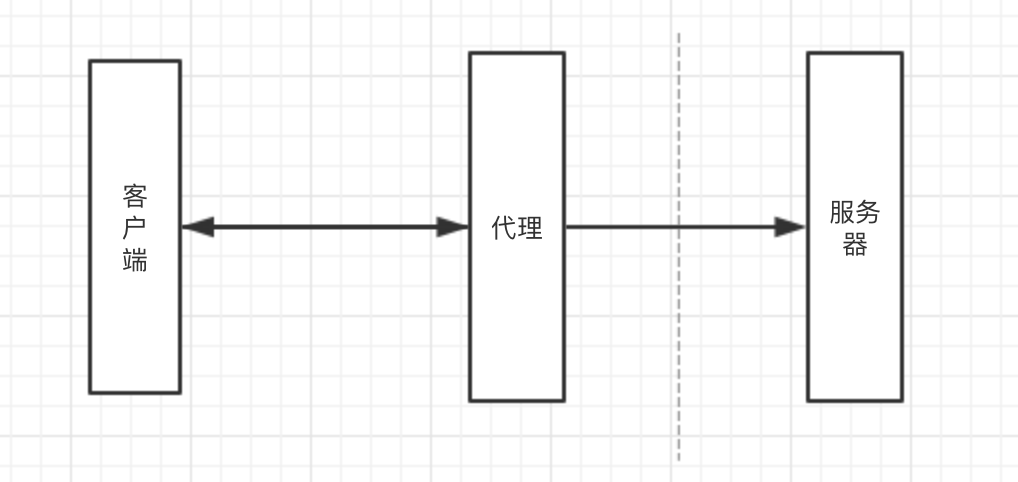
正向代理:
nginx正向代理

场景:使用代理服务器翻墙。

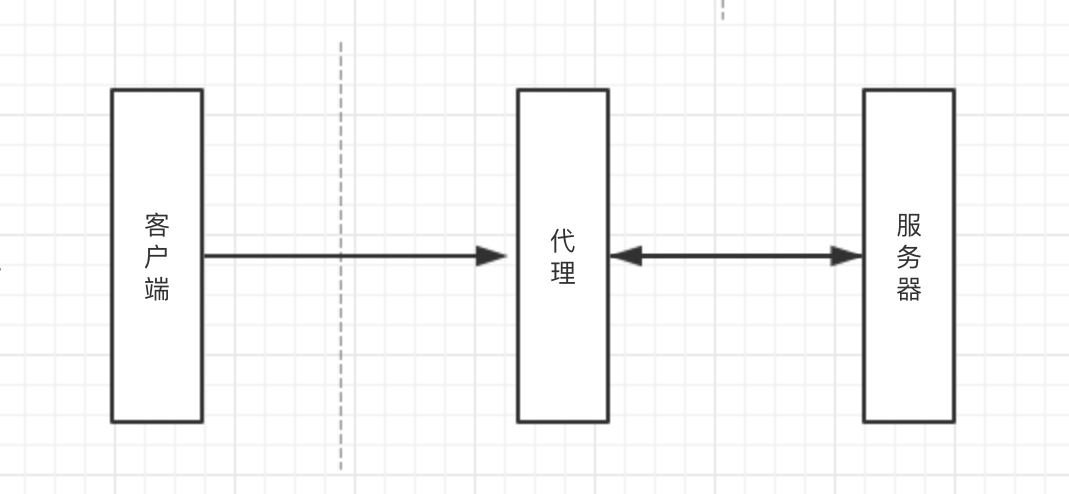
反向代理:

nginx正向代理

场景:使用反向代理实现负载均衡

正向代理和反向代理的区别:

代理的对象不一样,正向代理代理的是客户端,为了客户端能访问目标网站。反向代理的对象是服务端,代理设置是在服务端的,为了服务端能返回客户端所需数据。

配置实例:

反向代理:

1
2
3
4
5
//当服务器接受到请求后,将请求发送到 8080 端口。
location /
{
proxy_pass http://127.0.0.1:8080;
}

正向代理:

1
2
3
4
5
6
7
8
9
server
{
resolver 8.8.8.8;
listen 82;
location /
{
proxy_pass http://$http_host$request_uri;
}
}

nginx 实现正向代理上网,有三个关键点必须注意,其余的配置跟普通的nginx一样

1.增加dns解析resolver

2.增加无 server_name 名的 server

3.proxy_pass指令

正向代理测试:

curl设置代理访问: curl -x ip:82 test.com
wget设置代理访问 wget -Y on -e “http_proxy=http://ip:82“ “test.com”

代理配置更多配置参考:http://nginx.org/en/docs/http/ngx_http_proxy_module.html

负载均衡服务

缓存服务

Nginx 深入学习篇

Nginx 架构篇

------本文结束感谢阅读------
欣赏此文?求鼓励,求支持!